Automatic Call Recording and Transcription: Why Every Business Needs It
Most small businesses do not record their calls. They rely on notes, memory, and the occasional follow-up email to capture what was said. This works fine until it does not, and when it fails, it usually fails at the worst possible moment.
Automatic call recording and transcription fixes this without adding any work to your team's day. If you are already using an AI-powered phone system, recording and transcription should be the next thing you turn on. Looking for a complete solution? Check out our VoIP phone system with call recording that includes everything you need.
What Is Automatic Call Recording?
Automatic call recording captures every inbound and outbound call your business makes and stores it as an audio file. The recording starts when the call connects and stops when it ends. No one on your team has to press a button or remember to do anything.
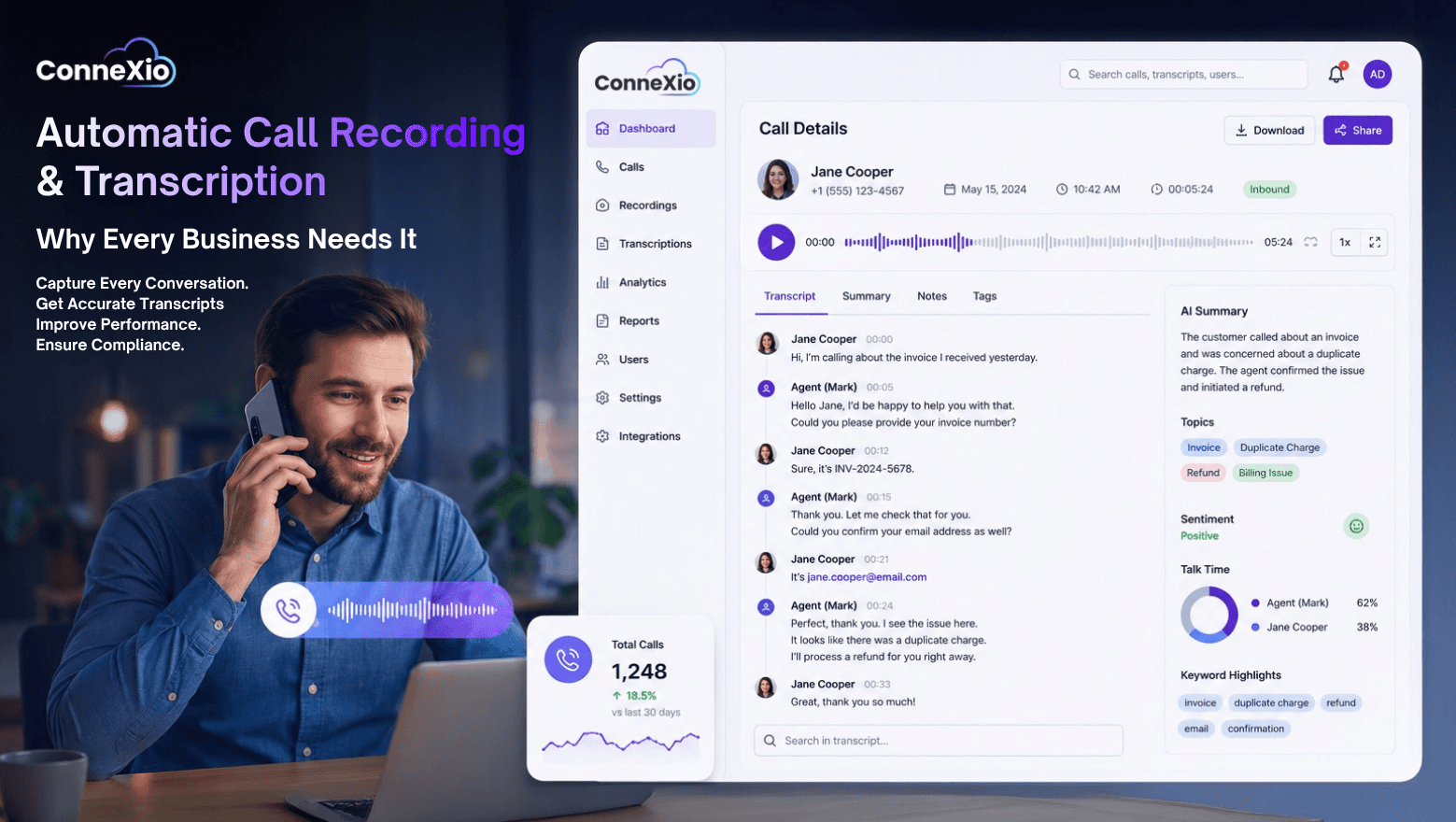
Depending on your platform, recordings are stored in the cloud and accessible through a dashboard. You can search by date, agent, phone number, or duration. Most platforms keep recordings for 30 to 90 days by default, with options to extend storage.
What Is Call Transcription?
Call transcription converts the audio recording into a text document automatically. Modern transcription uses AI to produce accurate, readable text with speaker labels so you can tell who said what throughout the conversation.
A good transcription system will also:
Timestamp key moments in the conversation
Flag keywords or phrases you define
Identify action items or next steps mentioned during the call
Detect sentiment shifts in the conversation
Summarize the call in a few sentences
The result is that instead of listening back to a 20-minute call to find one specific thing, you search the transcript and jump straight to it.
Why Does This Matter for a Small Business?
The benefits show up in a few different ways depending on how your team uses the phone.
For sales teams, recordings let you review exactly what was said in a deal conversation. You catch details that did not make it into the CRM notes. You identify what language works and what kills a deal. You can coach newer team members by showing them real examples rather than explaining abstract concepts.
For customer support, recordings resolve disputes instantly. When a customer says they were told one thing and your agent says something different, you do not have to guess. You play it back. This alone has significant value for any business that handles complaints or warranty claims.
For compliance, many industries require call recording. Financial services, healthcare, and legal businesses often have regulatory requirements around documentation of customer conversations. Automatic recording ensures nothing slips through.
For training, a library of real calls is the best training material you can give a new team member. Real conversations, real objections, real outcomes. Far more effective than role-playing exercises.
How Accurate Is AI Transcription?
Modern AI transcription runs at 90 to 95 percent accuracy for clear audio in standard English. Background noise, heavy accents, or poor call quality can bring that down. For business calls in typical conditions, the output is accurate enough to be genuinely useful without manual correction.
The technology has improved rapidly. A few years ago, transcription required significant cleanup to be readable. Today most outputs are clean enough to use directly for notes, CRM entries, or compliance documentation.
What Can You Actually Do with Transcripts?
This is where most businesses underutilize the feature. Recording is easy to turn on and easy to ignore. Here is how to actually use it:
Automatically log calls to your CRM. Connect your phone system to HubSpot, Salesforce, or whatever CRM you use. Call transcripts attach to the contact record automatically. No manual notes needed.
Build a call library for training. Tag recordings by call type, outcome, or agent. New hires can listen to 10 real sales calls in their first week and get up to speed faster.
Track competitor mentions. Set keyword alerts for competitor names. Any time a caller mentions a specific competitor, you get flagged. Useful market intelligence with zero extra effort.
Spot recurring issues. If the same question or complaint keeps coming up in transcripts, that is a signal. Maybe your pricing page is confusing, maybe a product feature needs better documentation, maybe a support process is broken.
Review deals that went wrong. When a prospect says no, replay the call. Pattern recognition across lost deals tells you things your team will not volunteer on their own.
Legal Considerations
Call recording laws vary by location. In the United States, federal law requires one-party consent, meaning only one person in the conversation needs to know it is being recorded. However, many states require two-party consent, meaning everyone on the call must be informed.
The safe approach for any business is to inform callers at the start of the call that the conversation may be recorded. Most businesses do this with a brief automated message before the call connects. This covers you regardless of which state or country the caller is in.
If your business operates internationally, check the laws in each country you regularly call. Requirements vary significantly.
What to Look for in a Recording and Transcription System
Not all systems are equal. Here is what separates a useful implementation from one that collects data no one ever uses:
Automatic recording with no manual steps required
Searchable transcripts, not just audio files
Speaker identification so you know who said what
Keyword flagging and sentiment detection
CRM integration so data flows where it is needed
Configurable retention periods
Compliance disclosure automation
Is It Worth Setting Up?
Yes, for almost every business that uses the phone. The cost of call recording and transcription is typically included in modern VoIP and UCaaS plans or available as a low-cost add-on. The time it saves, the disputes it resolves, and the training value it creates far outweigh whatever it costs.
The only question is whether you will actually use what you capture. Turn it on, connect it to your CRM, and review recordings as part of your regular team process. That is what separates businesses that benefit from it and businesses that just have a folder of audio files no one listens to.
ConneXio Cloud includes automatic call recording and AI transcription across all plans. Recordings are searchable, CRM-connected, and stored securely in the cloud. Learn more about our VoIP phone system with call recording →
🗓️
☎️
💬
All-in-one-Solutions!
Dialer, Omni-Channel Tools, CRM, Workforce Management, Real Time Analytics And More...
Comperation
Related Posts
Tips, product updates, and insights to help you get more out of ConneXio Cloud